ViTai Sensor Viewer
A desktop viewer for ViTai vision-based tactile sensors, built with PyQt6. Supports real-time image preview, force data visualization, and slip detection.
点击访问 GitHub - ViTai-Tech/ViTai-Sensor-Desktop >>>
Features
- Device scanning & auto-discovery (USB)
- Real-time multi-channel image preview (corrected, depth, marker)
- 6-axis force (Fx/Fy/Fz/Mx/My/Mz) real-time plotting
- Slip state detection
- Sensor calibration
- Custom ONNX weight loading (matched by sensor SN)
- Cross-platform (Linux / Windows)
Requirements
- Python 3.10+
- Linux x86_64 or Windows x86_64
- ViTai vision-based tactile sensor hardware
Quick Start
Run from Source
# 1. Install SDK
pip install wheels/linux/pyvitaisdk4bc-1.0.9-py3-none-linux_x86_64.whl
# Windows:
# pip install wheels/windows/pyvitaisdk4bc-1.0.9-py3-none-win_amd64.whl

# 2. Install dependencies
pip install -r requirements.txt

# 3. Run
python main.py
Package
python build.py
Packaged executable will be in the dist/ directory.
Usage
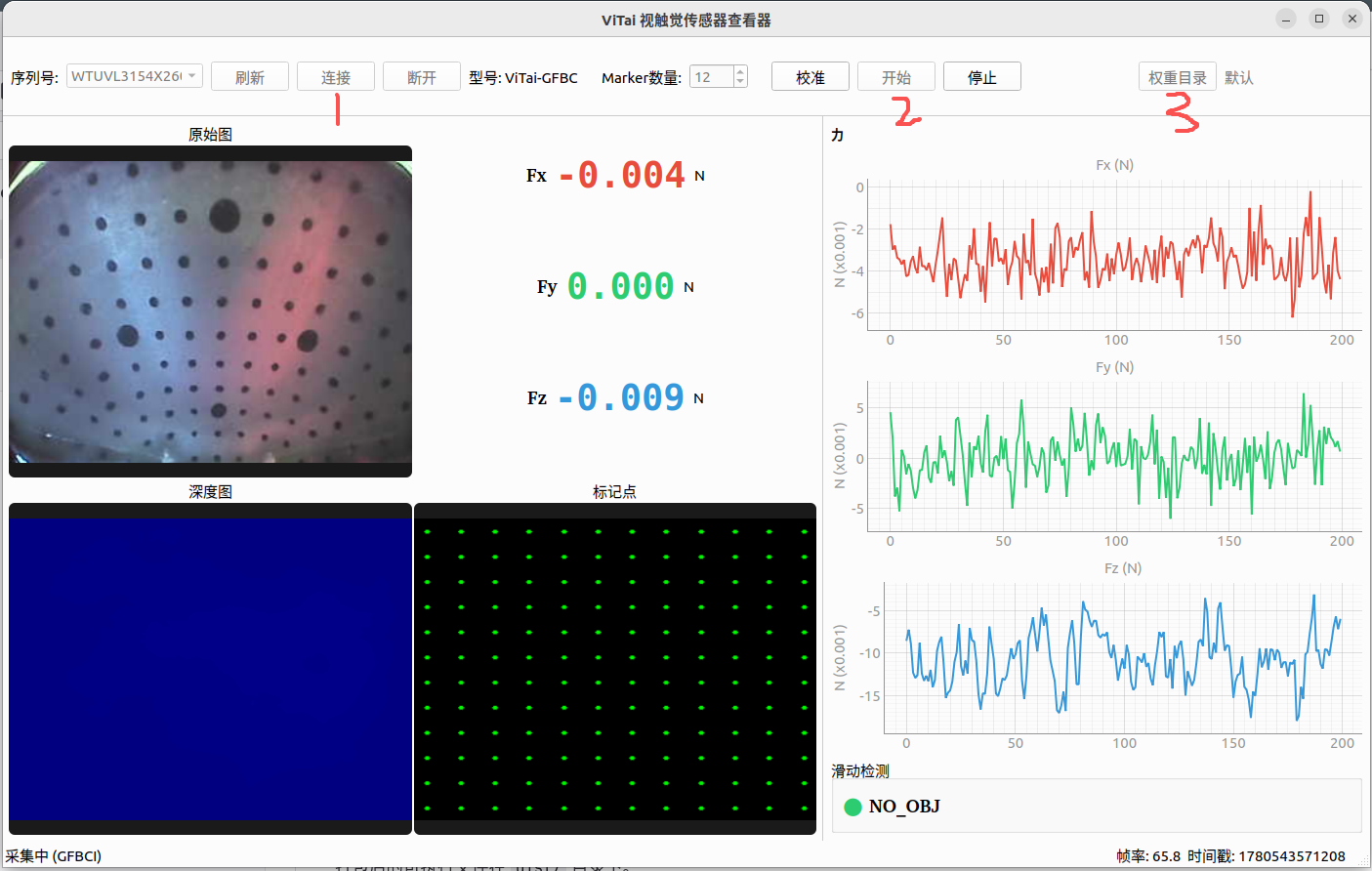
Follow the numbered buttons on the interface:
③ Weight Directory (optional) — Click "Weight Directory" to select a folder containing custom ONNX weight files. The program automatically matches weights to sensor SNs.
BC_20260529_mini/
├── WTUVL2141X2600004/
│   ├── WTUVL2141X2600004.onnx.enc
│   └── normalization_params.json
└── WTUVL2141X2600003/
    └── ...
① Connect — Select a sensor from the SN dropdown and click "Connect". Data collection starts automatically once connected.
② Start (resume after stop) — If you pressed "Stop", click "Start" to resume without reconnecting.
Project Structure
sensor-desktop-app/
├── main.py                 # Entry point
├── build.py                # Build script (SDK + deps + PyInstaller)
├── requirements.txt        # Python dependencies
├── ViTaiViewer.spec        # PyInstaller spec
├── app/
│   ├── main_window.py      # Main window (UI + signals + lifecycle)
│   ├── sensor_worker.py    # Sensor data acquisition worker thread
│   └── widgets/
│       ├── device_panel.py   # Top device control bar
│       ├── image_viewer.py   # Left image display area
│       └── data_panel.py     # Right data panel (force plots + slip status)
├── wheels/
│   ├── linux/              # Linux SDK wheel
│   └── windows/            # Windows SDK wheel
└── image.png               # Screenshot
Troubleshooting
| Issue | Solution |
|---|---|
| Sensor not detected | Verify USB connection, click "Refresh" |
| Choppy video | Default display rate is 30fps, adjust display_freq in main_window.py |
Build error appdirs | Already handled; ensure build.py includes --hidden-import appdirs |
| NumPy version conflict after packaging | Ensure numpy < 2.0; pyvitaisdk depends on numpy<=1.26.4 |
License
Internal use.